The whole agency.
The Monthly brief, profit, the book, the team and the plan. Department managers and account managers see premium within their scope, not commission or payout figures.
See the owner review →
How it works
You upload the reports your AMS and accounting system already produce. Keelridge checks them and turns them into one review of profit, the book and the team. Upload a fresh report whenever you want, and every figure updates.
Owners, managers and account managers each see the part their role allows.
Free for five design partners until February 15, 2027. It starts with a 20-minute call; no files needed.
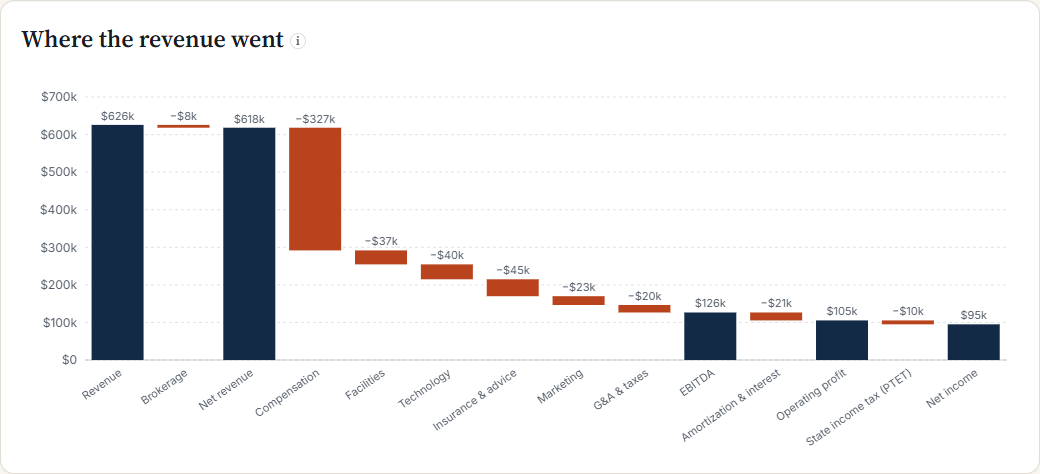 Owner viewOpen this page in the live demo →
What you upload
You export a report from your AMS and from your accounting system and upload it. Upload a fresh one whenever you want and every figure updates. You upload, or someone you authorize. Keelridge checks each file and shows you what it found before anything changes.
Keelridge reads the reports you upload. It does not connect to your AMS directly. Cash balances are typed in by hand. Agencies on any AMS and accounting system can apply: what decides it is whether your reports can be read, and we check that before setup.
Your AMS stays the record · people make the decisions
Implementation and platform
We start with your management questions, the reports behind them and who needs to see what.
Who sees what
Everyone works from the same reports and definitions. Each person sees what their role allows.
The Monthly brief, profit, the book, the team and the plan. Department managers and account managers see premium within their scope, not commission or payout figures.
See the owner review →How each direct report's book keeps its clients and grows, read beside workload and service quality when planning support.
See the team review →Their own results, the renewals coming due and their list of one-policy clients. If you give them access by name, they also see the new business opportunities that name them. Policy and client work stays in your AMS.
See My Book →Access follows the roles and book assignments you set. Keelridge does not assign work or turn a book measure into an employee score; people make the decisions.
Now inviting five design partners
Keelridge is free for five design partners until February 15, 2027. It starts with a 20-minute fit call. If it fits, you get a personal invitation code and accept the terms online. Then we set up your portal with you.